 Merging Codes on
Lookup Tables
Merging Codes on
Lookup Tables
Merging Codes on
Lookup TablesUse the Merge function to globally merge a drop-down code with another one, whenever it occurs in the Results database eliminating the need to check every record in a data center for the value to be merged.
To Merge a Code:
1. From the Setup Main Menu,
in the Maintain Lookup Values Module
group, point to the desired module and then select the Lookup
Table you would like to modify. In our example, we selected Finances > Product Lines and IRRIGA-001
from the list of current drop-down values.
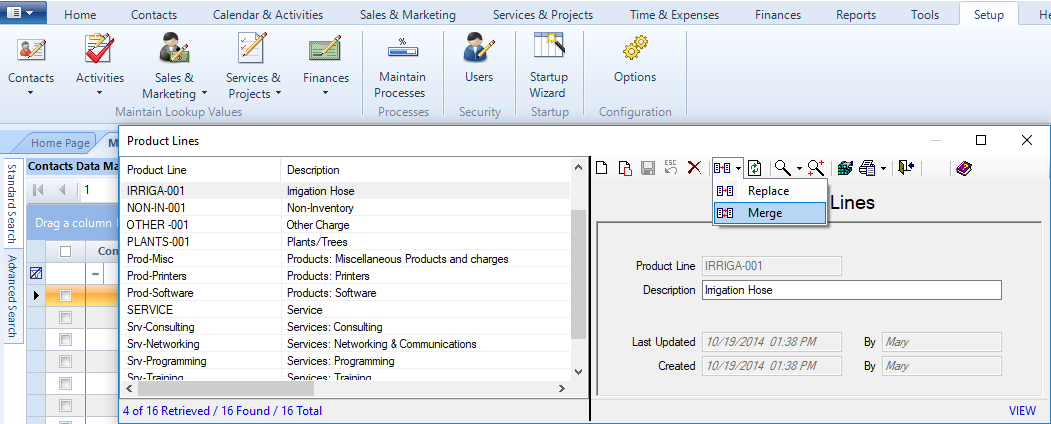
● Select the Merge option
from the Replace / Merge icon in the Toolbar
of the data entry screen to display the Merge Primary
Field dialog.
2. Enter the code
you would like to merge with in the New Value
field.
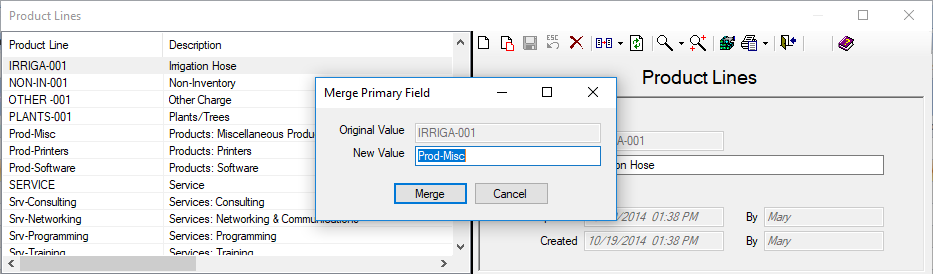
3. Click Merge to display a Merge Configuration
prompt.
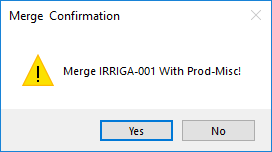
4. Click Yes to merge the codes. The original code is removed from the list of current drop-down values.

Note: To successfully merge, the value entered in the New Value field must already exist in the list.
ResultsCRM User Help (August 2018)
