 Editing a Lookup
Table Entry
Editing a Lookup
Table Entry
Editing a Lookup
Table EntryTo edit a Lookup Table Entry:
1. From the Setup Main Menu,
in the Maintain Lookup Values Module
group, point to the desired module and then select the Lookup Table
you would like to modify. In our example we selected Finances
> Expense Types. The following type of screen will display.
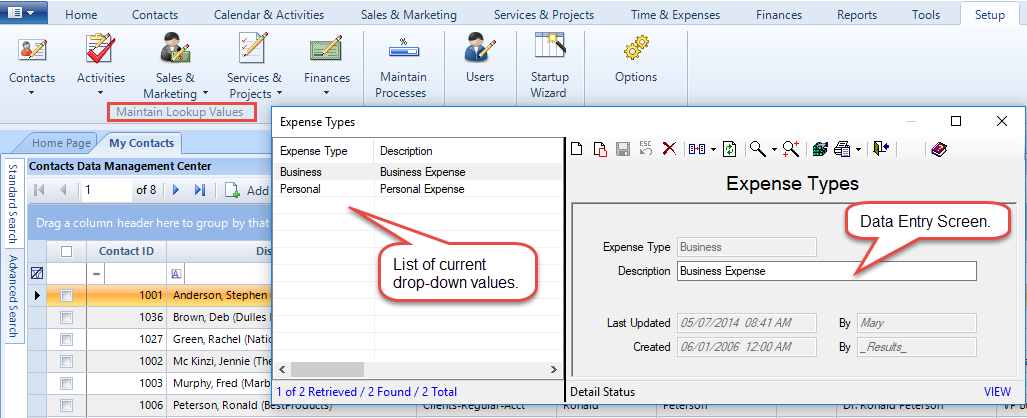
2. Select the entry you would like to edit from the list in the left grid.
3. Type the changes
in the Data Entry screen.
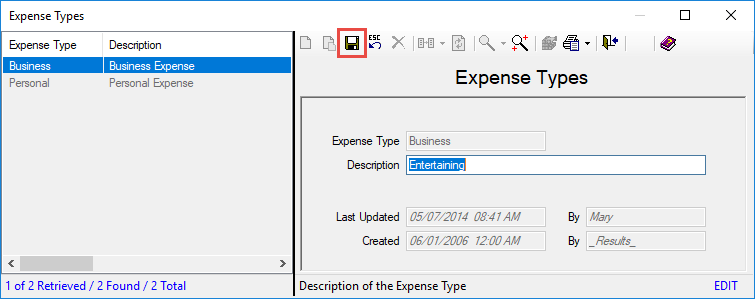
4. Click the Save icon.

Note: The code cannot be directly edited. See
the sections called
Replace and Merge
for guidance on editing the value of the code.
ResultsCRM User Help (August 2018)
